 POCKETHAM
POCKETHAM
POCKETHAM
Install PocketHam on your Mac or PC, scan one code with your phone, and your models, agents and files go everywhere you do. No VPN. No account. No port forwarding.
Works with Ollama, LM Studio, llama.cpp, MLX, Jan, Hermes and more. End-to-end encrypted.
 NO CLOUD AI
NO VPN
NO CLOUD AI
NO VPN
easier than a VPN. way more punk.
Put PocketHam on the Mac or PC that runs your AI. It finds your models and agents on its own.
Open PocketHam on your iPhone and scan the code on your computer screen. That pairs them for good.
Home Wi-Fi, cell, a hotel, the rink. Open the app and your AI is right there, sealed end to end.
A VPN connects devices. PocketHam connects you to your AI. One app, built for exactly this, with nothing to configure.
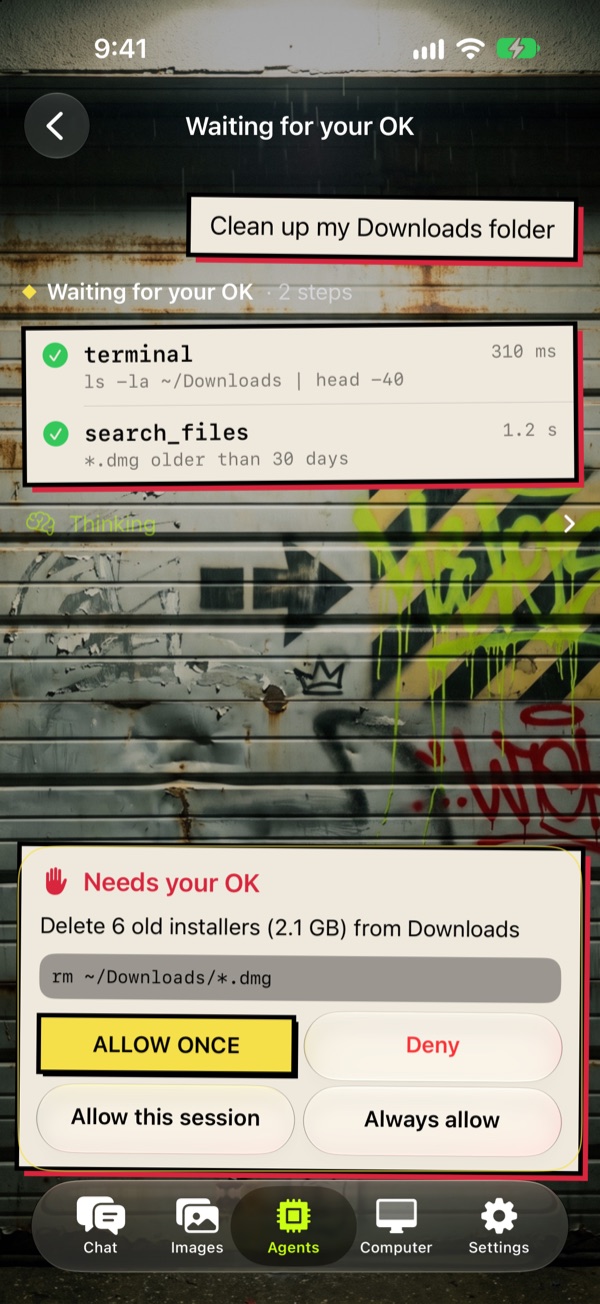
Hand a task to Hermes, opencode, Goose, Codex, Claude Code and more, then watch every step from your phone. When an agent wants to do something big, it waits for you: allow once, allow for the session, or deny.
work for yourself.
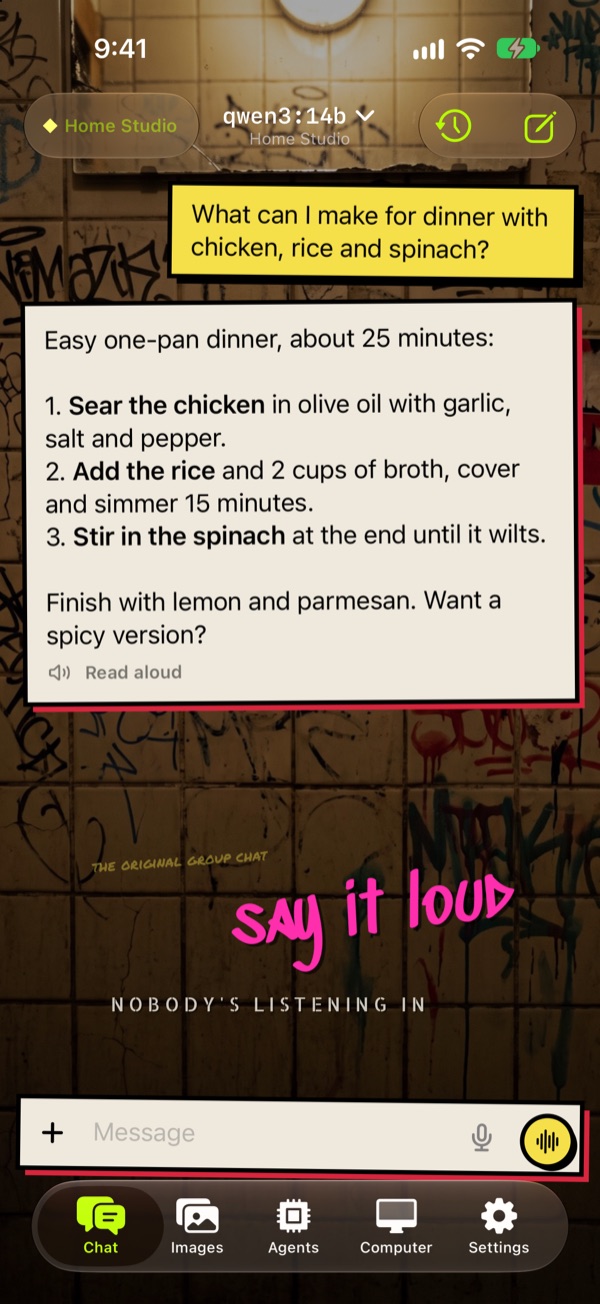
Every model on your computer, by name. Switch with a tap. Replies stream straight from your own machine.
Dictate on the phone and hear natural voices made by your own computer. Your voice stays on your devices.
Browse the folders you choose, preview anything, and pull files to your phone. Big file on cell? It offers to wait until you're home.
A full shell on your computer, from your phone. Fix things from the couch or the car line.
Open the dashboards and tools running at home in a built-in browser, from anywhere. Only the ones you share.
Pair your Mac and your PC to one phone. See what each AI app is using and free memory with a tap.
bring your own stack.
Pair as many as you own to one phone.
Home Wi-Fi, cell, or any network.
Running something else? Any local server that speaks the OpenAI-style API is found automatically, on any port.
Plus any agent that speaks the Agent Client Protocol. Every one passes our compatibility lab before a release.
Your phone and computer talk directly whenever they can, sealed with keys only your devices hold. When a network gets in the way, the sealed connection hops through a relay that can't read it. Your prompts, files and voice stay yours. No cloud AI ever sees a word.
who do they think they're fooling? you?
A VPN links whole devices and leaves the rest to you: addresses, ports, and finding apps that work over it. PocketHam is one app built for your AI. It pairs with a scan, finds your models and agents by itself, and only its own traffic goes home. Everything else on your phone works exactly as before.
No cloud AI is involved. Your models, chats, files and voice stay on your computer and your phone. When a direct connection isn't possible, sealed traffic passes through a relay, which can't read it.
Neither. You pair your phone by scanning a code on your computer. It works through home routers and firewalls as they are.
A Mac (Apple silicon) or Windows PC running a local AI app like Ollama or LM Studio, and an iPhone.
Yes. On Wi-Fi at home it connects directly. On cell or another network it connects directly when it can and through the tunnel when it can't.
Hamsters carry everything in their cheeks and live in tunnels. Also ham radio: talking to your home station from anywhere.
support local AI. DIY or die.
Signed by Meadow Mountain AI. Updates install from inside the app.